Download Nebula, run the installer, allow it once in SmartScreen, then open it for the first time.
You need
- Windows 10 or 11 (64 bit)
- 2 GB of free disk space
- an email address for your free key
- MetaTrader 5 (optional for the first open, needed to deploy)
Steps
Download the installer
On orionrfx.com/pages/download press Download free for Windows.
The file is called Nebula-0.4.54-win-x64.exe. The number changes with each release.
Open the file
Open it from your browser's downloads list or your Downloads folder. Nebula is not signed with a code signing certificate yet, so Windows may stop it once.
Get past "Windows protected your PC"
Click More info, then Run anyway. The box lists the publisher as Unknown publisher. That is expected for this build.
More info›Run anyway
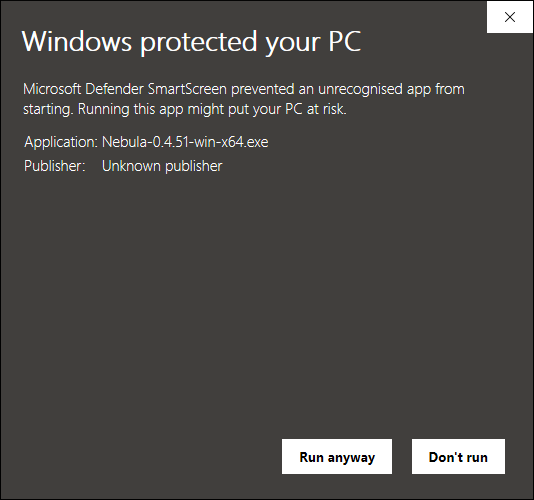
Agree to the licence
The first page is the Nebula licence, installation and data agreement. Read it, then click I Agree. It covers Polaris shared learning, which is on by default. You can switch it off later in Settings.
Choose who it is for
The installer asks Who should this application be installed for? Leave Only for me selected. It needs no administrator password.
Keep the install folder
The default folder is C:\Users\<you>\AppData\Local\Programs\Nebula.
Change it only if your user drive is short of space. Nebula always adds a Nebula folder to whatever you pick.
Finish and open Nebula
The installer adds a Nebula shortcut to your desktop and Start menu. Leave the run box ticked on the last page and click Finish.
Watch the start window
A small window checks six things in order: Engine, Files, Space, Licence, Data, Broker. Each one turns green. A first start can take longer while Windows scans the new files.
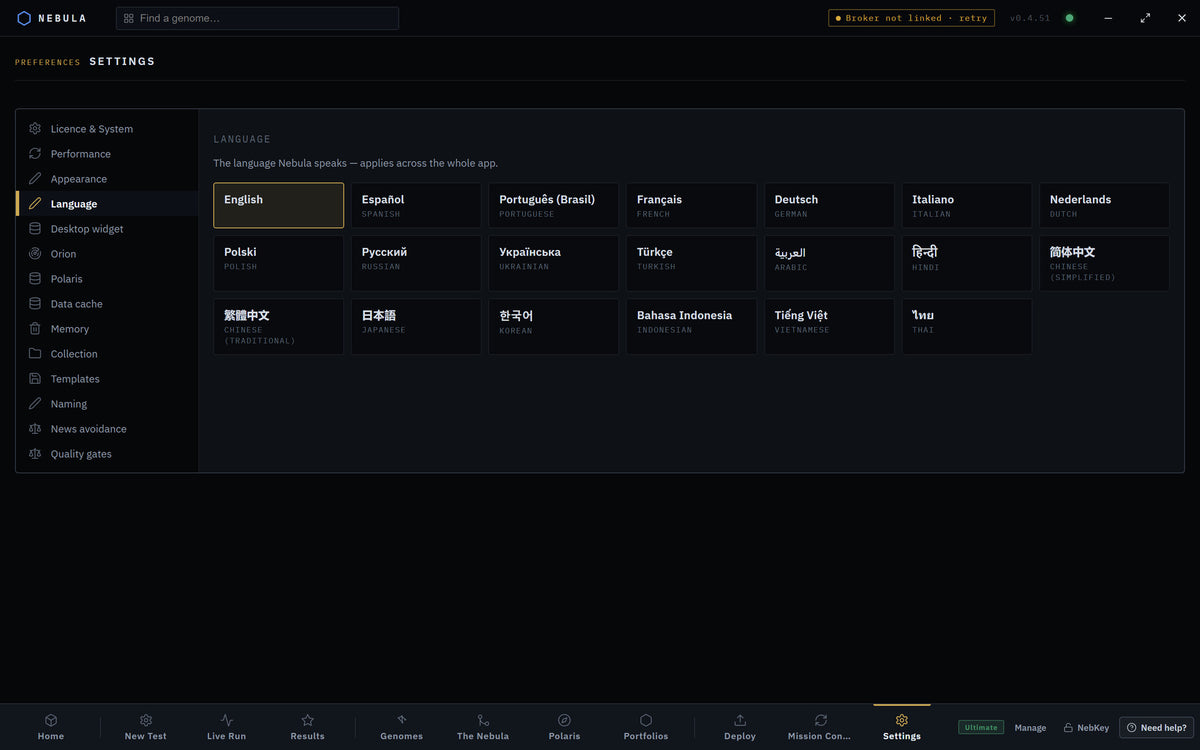
Pick your language
Choose your language from the list. You can change it any time in Settings › Language.
Get your free key
Type your email and press Get my free key →. The key activates on this computer and a copy goes to your inbox. Already bought a plan? Press I already have a key and paste the code from your order email instead.
Launch
The launcher shows Status rows for Engine, Licence, Library and Broker. Press Launch Nebula (or Enter). No MetaTrader yet? Press Launch without a broker.
Installer options
| Option | What it does | Default | Plan |
|---|---|---|---|
| Only for me | Installs into your own user folder. No administrator prompt. | On | All |
| Anyone who uses this computer | Installs for every Windows user. Windows asks for an administrator. | Off | All |
| Install folder | Where the app files go. Your systems and settings live elsewhere. | AppData\Local\Programs\Nebula |
All |
| Desktop shortcut | Added every time. | Always | All |
| Start menu shortcut | Added as Nebula. | On | All |
| Run Nebula on Finish | Opens Nebula when the installer closes. | Ticked | All |
Where everything lives
| What | Where |
|---|---|
| The app |
C:\Users\<you>\AppData\Local\Programs\Nebula (unless you changed it) |
| Your systems, settings and price data | C:\Users\<you>\AppData\Roaming\Nebula |
| Your licence | C:\Users\<you>\.nebula |
Uninstall Nebula
Close Nebula
Close it from the window. If Fully hands free monitoring is on, also quit it from the tray icon.
Remove it
Open Windows Settings › Apps › Installed apps, find Nebula, then Uninstall. The uninstaller closes anything Nebula left running before it removes the files.
Know what stays
Your saved systems, settings and licence stay on the computer. A reinstall picks them up. EAs you deployed stay in MetaTrader and keep trading until you remove them there.
If something goes wrong
"Windows protected your PC" and only Don't run
WhyThe details are folded away
FixClick More info first. Run anyway appears.
Your antivirus quarantines the installer
WhyUnsigned installers trip some scanners
FixRestore the file from quarantine, allow it, run it again.
Your disk is full. Free 2 GB, then try again.
WhyThe start window checks free space
FixFree at least 2 GB, then press Try again.
Some engine parts are missing. Reinstall Nebula.
WhyFiles were removed, often by antivirus
FixPress Get installer, reinstall, allow Nebula in your antivirus.
Show 4 more
The engine did not start. or The engine is not answering.
WhySecurity software blocked the local engine
FixPress Try again. If it repeats, allow Nebula in your antivirus, then press Send report.
Nebula cannot save its files.
WhyYour user folder is not writable
FixCheck your antivirus folder protection allows Nebula.
Continue offline this time on the key step
WhyThe key server could not be reached
FixUse it to get in now. Get your free key next time you are online.
The launcher says Broker Not found
WhyNo MetaTrader on this PC yet
FixFine for testing. Install MetaTrader 5 before you deploy.
Questions
Does Nebula need administrator rights?
No. With Only for me it installs into your own user folder.
Do I need MetaTrader to install it?
No. You can test on downloaded history. You need MetaTrader 5 to deploy.