Set how hard Nebula works your computer, how it looks and the language it speaks.
You need
- Nebula open
- the engine online for the sections that read it (Performance, Price data, Genomes)
How Settings is laid out
Click Settings in the tab bar. Sections sit in a rail on the left, in five groups. Click one and it fills the right side.
Settings
| Group | Sections |
|---|---|
| Account | Licence & System, Performance, Support |
| Display | Appearance, Language, Desktop widget |
| Assistants | Orion, Polaris |
| Library | Price data, Memory, Genomes, Templates, Naming |
| Trading | News avoidance |
Low power mode
Open Performance
Settings›Performance
Scroll past the processor stages to Low power mode. It shows On or Off and your RAM, for example On · 7.8 GB RAM.
Pick a mode
| Option | What it does | Default |
|---|---|---|
| Auto | On for machines with 8 GB of RAM or less | Yes |
| On | Always use the light designs | |
| Off | Always use the full visuals |
Know what changes
While it is on:
- no 3D scenes, and no animated skies, moon or planets
- animation capped at 15 frames a second
- lighter canvases, and the Live Run uses a still dial with fewer curves
- slower account checks, and no background blur
Your tests search and score exactly the same. The processor stage is a separate setting.
Processor stage
Settings›Performance
Pick how much of your processor Nebula uses while it searches. It takes effect on your next run.
| Stage | Uses | Lowest plan |
|---|---|---|
| Eco | About a quarter of your cores. Quietest | Free |
| Balanced | About half. Nebula stays quick and your PC stays usable | Free |
| Turbo | About three quarters. Noticeably faster | Starter |
| Max | Every core. Fans spin up and the machine runs hot | Pro |
The default is Balanced, marked Recommended. A locked stage shows the plan that opens it. The line above the cards says how many cores are in use.
Language
Settings›Language
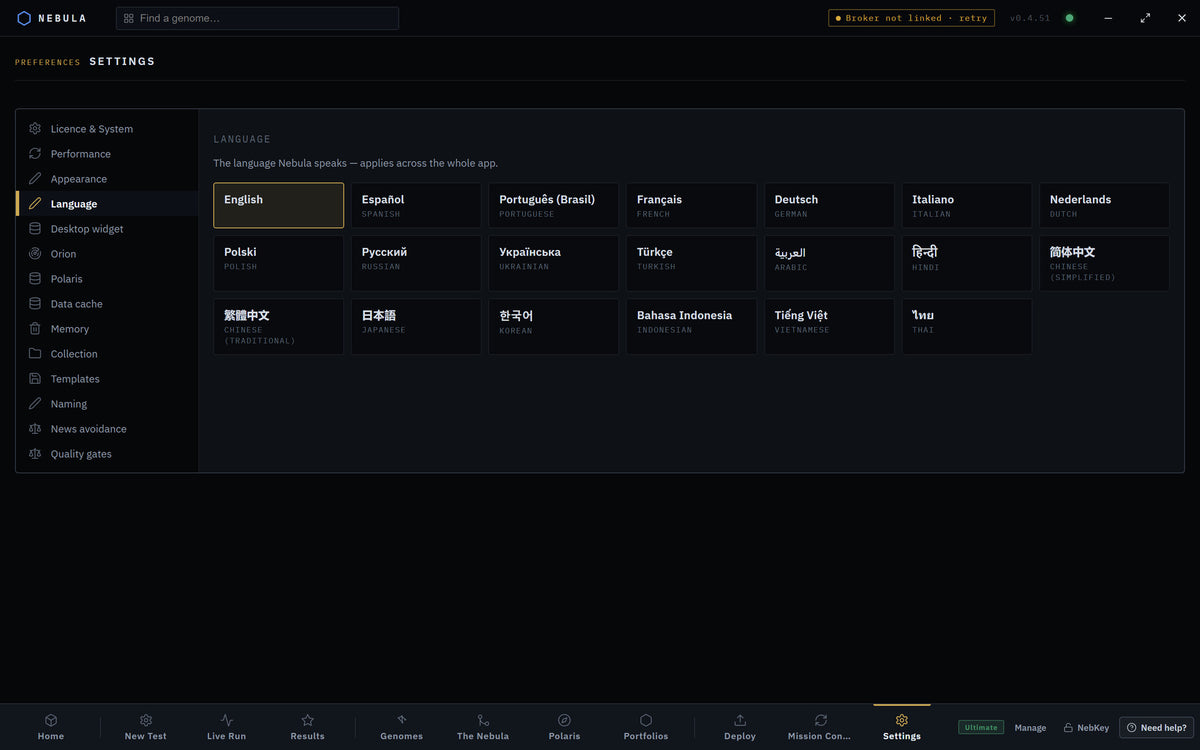
Click a language. Nebula switches across the whole app.
| Languages offered |
|---|
| English, Español, Português (Brasil), Français, Deutsch, Italiano, Nederlands, Polski, Русский, Українська, Türkçe, العربية, हिन्दी, 简体中文, 繁體中文, 日本語, 한국어, Bahasa Indonesia, Tiếng Việt, ไทย |
Appearance
Settings›Appearance
Choose where the main tab bar lives. It applies at once and is remembered.
| Option | What it does | Default |
|---|---|---|
| Bottom | Tabs along the foot of the window | Yes |
| Top | Tabs just under the window bar | |
| Left | A vertical rail on the left edge | |
| Right | A vertical rail on the right edge |
The other sections
| Section | What you do there | Default | Plan |
|---|---|---|---|
| Licence & System | See your tier and machine ID. Redeem NebKey… or Re-activate. Manage subscription opens billing on orionrfx.com. Check MetaTrader, broker and account. Re-acquire broker spec, ↺ Rescan installs, Add terminal folder… | n/a | All |
| Licence & System › Updates | Your version and Check for updates | n/a | All |
| Licence & System › Put new EAs on charts automatically | After a deploy, MetaTrader closes and reopens once with the EA on its chart | On | Windows with MT5 |
| Support | Send crash reports automatically, Report a problem, Your reports | Off | All |
| Desktop widget | Minimize to desktop widget: minimising drops Nebula to a small ticker with live equity, drawdown and open profit | Off | All |
| Orion | Phone alerts & control (Telegram) | Off | Pro and Ultimate |
| Orion | Fully hands-free monitoring: opens at login and runs in the tray to keep tracking your systems | Off | Ultimate |
| Polaris | How far Polaris has learned, What is this? Learn more, and the focus modes | n/a | All |
| Price data | Extra history data downloads, and your cached broker data with Refresh | n/a | All |
| Memory | Delete saved strategies, passed systems, portfolios, baked EA files, or EVERYTHING. View blacklist | n/a | All |
| Genomes | Auto-save passing systems to Genomes, Shared network (Polaris) | Both on | All |
| Templates | Save current settings as a named run setup, and recall it | None | All |
| Naming | Naming mode, Name prefix, Funny metre, then Save naming | Standard, no prefix, 15% | All |
| News avoidance | Minutes before and after high impact news with no new trades | 30 before, 15 after | All |
Deleted saved or passed systems wait in Recently deleted for 30 days. Portfolios and baked EA files on disk cannot be put back.
If something goes wrong
The window reloads or goes blank during a test
WhyThe machine ran out of memory
FixSet Low power mode to On
Low power is on but you have plenty of RAM
WhyYou picked On
FixPick Auto or Off
Reading your machine's core count… stays
WhyThe engine is not connected
FixWait for the engine, or restart Nebula
A stage shows a lock
WhyYour plan tops out lower
FixPick a lower stage, or upgrade
Show 3 more
Bridge offline: start the engine to read the data cache.
WhyThe engine is not connected
FixWait for the engine dot to turn green
The desktop widget option says it needs the installed app
WhyYou are in a preview
FixUse the installed Nebula
A stage change did nothing
WhyIt applies to the next run
FixStart a new test
Questions
Does low power mode make my results worse?
No. Tests search and score exactly the same.
Why is Max locked?
Max needs Pro or Ultimate. Turbo needs Starter.
Can I change the language later?
Yes, any time in Settings › Language.