Make your own Telegram bot, pair it with Nebula, and control the desk from your phone.
You need
- Nebula Pro or Ultimate
- the Telegram app on your phone
- Nebula open on your computer
Steps
Open the Telegram settings
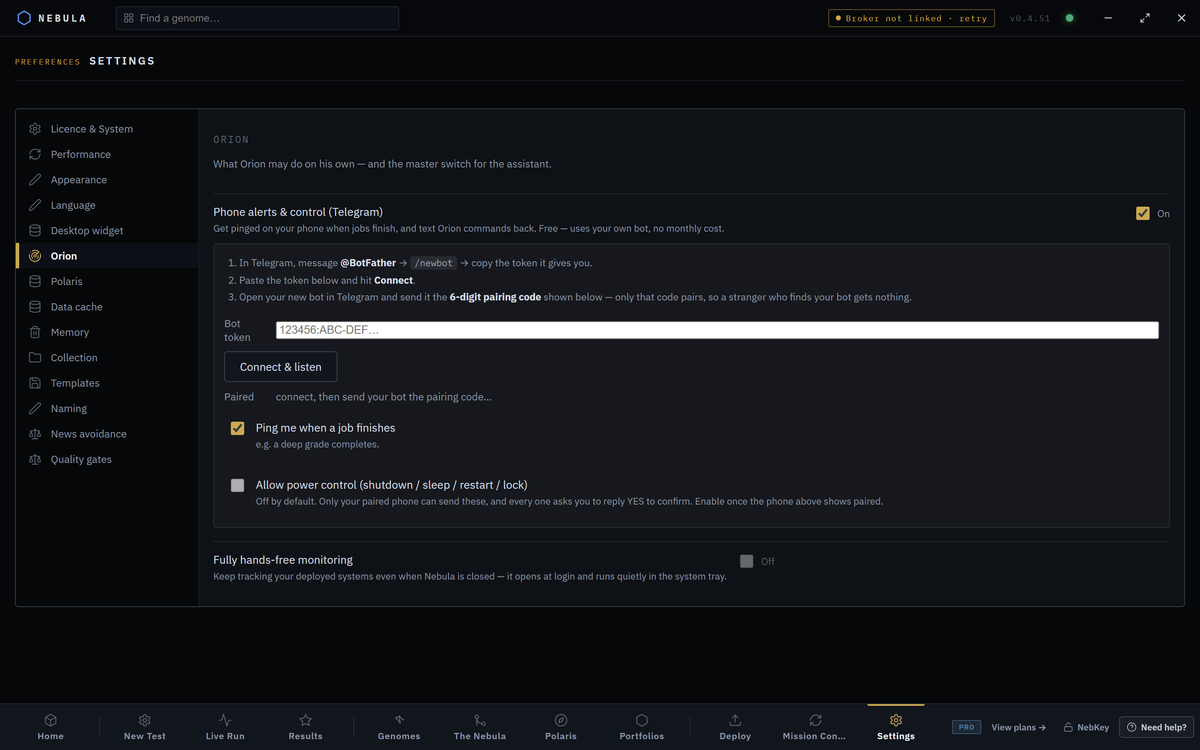
In Nebula, open Settings. Under Assistants, click Orion. Find the block Phone alerts & control (Telegram).
Settings›Orion›Phone alerts & control (Telegram)
Switch it on
Tick the switch on the right of the block. It reads On. The three setup steps and the token box appear under it. On Nebula Free or Starter the switch is greyed out.
Make a bot with BotFather
In Telegram, message @BotFather and send /newbot.
Give it a name and a username. BotFather replies with a token. Copy it.
Paste the token
Paste it into Bot token in Nebula. The box hides what you type.
A token looks like 123456:ABC-DEF….
Press Connect & listen
Press Connect & listen. It says Checking… while it works. Success shows your bot's name in green, like @YourBot · listening.
Send the pairing code
Next to Paired, Nebula shows a 6 digit code in gold. Open your new bot in Telegram and send it exactly that code. Only that code pairs. A stranger who finds your bot gets nothing.
Check it paired
Paired turns green and shows chat with a number and a tick.
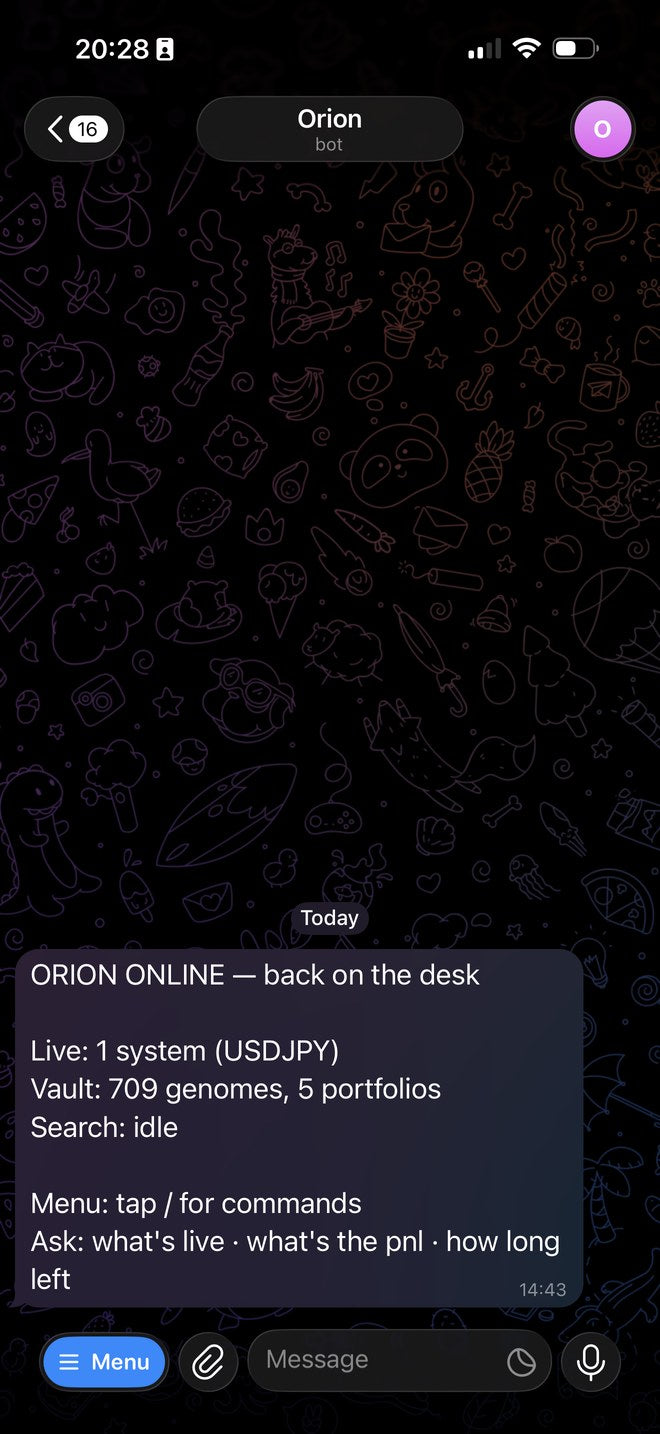
Your phone gets a greeting with what is live, your vault and the search state.
Choose your options
Set the two ticks under Paired. See the table below.
Options
| Option | What it does | Default | Plan |
|---|---|---|---|
| Phone alerts & control (Telegram) switch | Turns the phone link on or off | Off | Pro and Ultimate |
| Ping me when a job finishes | Sends a line when a deep grade you started from the phone completes | On | Pro and Ultimate |
| Allow power control (shutdown / sleep / restart / lock) | Lets your paired phone shut down, sleep, restart or lock this computer. Each one asks you to reply YES | Off. Greyed until the phone shows paired | Pro and Ultimate |
What Nebula sends you
| Alert | When it arrives |
|---|---|
| Risk stop | A risk limit closed a system's trades. It says if a stop could not be confirmed and tells you to act in MetaTrader. One message per event, naming every system |
| Unconnected EA | Nebula finds a new EA on your account it is not tracking |
| Data download done | A download you started from the phone finished |
| Deep grade finished | A deep grade you started from the phone completed, while Ping me when a job finishes is on |
| Shutdown after a run | The run finished and your queued shutdown or restart is on its way |
| Autonomous digest | An Autonomous mission ended and you ticked Send a Telegram digest when it ends (Ultimate) |
| Back online | Nebula restarted and the phone link is live again |
Drift warnings such as WATCH or UNDER stay inside Nebula. They are not sent to the phone.
Phone commands
Tap / in your bot chat for the menu. Plain words work too.
| Command | What it does |
|---|---|
/status |
How everything is doing right now |
/pnl |
Live balance, equity and open trade profit, with a per system breakdown |
/progress |
How far through the current search |
/run EURUSD H4 |
Start a search on that market and timeframe |
/pause |
Pause the running search |
/stop |
Abort the running search |
/best 5 |
Your strongest systems |
/worst |
Your weakest systems |
/grade |
A quick scoreboard of everything saved |
/deepgrade |
A full lab report on your newest systems |
/download EURUSD H1 |
Pull market data |
/shutdown |
Shut the computer down after a countdown you can cancel |
/sleep |
Sleep the computer |
/lock |
Lock the screen |
/cancel |
Stand down a scheduled shutdown |
/help |
Everything the bot can do |
You can also send restart, or shut down when the run finishes.
How power commands stay safe
| Rule | Value |
|---|---|
| Who can send them | Only your paired chat |
| Needs Allow power control | Yes |
| Confirm step | Reply YES. A YES is valid for 60 seconds |
| Countdown before shutdown or restart | 60 seconds, never less than 5 |
If something goes wrong
The switch is greyed out
WhyYour plan is Free or Starter
FixUpgrade to Pro or Ultimate
A red error next to Connect & listen
WhyThe token is wrong or incomplete
FixCopy the whole token from BotFather again and press Connect & listen
No gold code appears
WhyThe listener did not start
FixPress Connect & listen again. Check the computer is online
The bot does not answer the code
WhyNebula is closed, or you sent extra text
FixKeep Nebula open. Send only the six digits
Show 4 more
The bot ignores you after many tries
WhyA code stops working after 10 wrong attempts
FixPress Connect & listen to get a fresh code
Allow power control cannot be ticked
WhyThe phone is not paired yet
FixFinish pairing first
The bot answers "I didn't catch that one"
WhyIt works from a fixed command set
FixSend /help and use a listed command
No messages while you are away
WhyNebula is closed
FixLeave Nebula running. On Ultimate, Fully hands-free monitoring keeps it in the tray
Questions
Does Telegram cost anything?
No. You use your own bot, with no monthly cost.
Can someone else control my desk if they find the bot?
No. Only the chat that sent your pairing code is answered.
Does Nebula need to be open?
Yes. The phone talks to Nebula on your computer.