Read every panel in Mission Control and act on a system that drifts from its test.
You need
- Nebula Starter, Pro or Ultimate
- at least one system deployed from Nebula
- MetaTrader open with the EA on its chart and Algo Trading on
What Mission Control is
Mission Control is the tab where every EA you deployed from Nebula lives. It reads your real broker trades and compares each system with the test that produced it. It checks all the time while Nebula is open.
| Plan | What you get in Mission Control |
|---|---|
| Nebula Free | A locked page with the STARTER AND UP pill. Your free deploy still works. |
| Nebula Starter | The full board: live tracking, health words, drift warnings, Pause, Close positions, Replace by hand |
| Nebula Pro | The same as Starter |
| Nebula Ultimate | Everything above, plus Auto replace when it fades, Restore previous and whole book swaps |
Steps
Open the tab
Click Mission Control in the tab bar. The tab bar sits along the bottom unless you moved it in Settings.
Mission Control
Check the view you are on
Mission Control opens on the new merged view. A Classic view button sits top right if you prefer the older layout. Nebula remembers your pick.
Mission Control›Classic view
Read the headline
The big word on the left is the verdict for the whole account. The line under it names the systems that need you. Hover the line for the full sentence.
Read the six figures
The strip across the top is your account right now. Each label has a tooltip.
| Figure | What it shows |
|---|---|
| Floating | Open trades marked to market now, with the count open under it |
| Book result | Closed trades since each deploy, from your broker's deals, and the share of balance |
| Account drawdown | How far the account sits below its peak, open trades included. Shows your ceiling, or off |
| Open risk | Planned risk per trade on every open trade, added up |
| Pulse | EAs Nebula can hear right now. Hosted copies count as heard |
| Pooled read | Every system's live trades pooled together. Opens at 200 closed trades |
The dot next to the figures says Live, Idle, Reconnecting or Offline. Offline means MetaTrader is not reporting.
Use the fleet list
The left column is Fleet, with every tracked system. Whole book at the top shows the account as one. Filter chips: All, Needs you, Watch, Gathering, Paused, Books, Singles. Press Ctrl+K to jump to a system, leg, symbol or magic number.
Read each system's status word
Each tile carries one word from the live judge.
| Word | What it means | What to do |
|---|---|---|
| ON TRACK | Inside its tested range | Nothing |
| WATCH | Drifting inside its limits | Keep an eye on it |
| UNDER | Live results are below what its test promised | Open it and consider Replace |
| 12/20 (a count) | Gathering. Bands are judged from 20 closed trades | Wait |
| PAUSED | Opens nothing new until you resume it. Open trades stay managed | Resume when ready |
| STOPPED | The risk stop closed its trades | Resume, replace or remove it |
| NOT RUNNING | No pulse and no open trades. The EA has left its chart | Put it back on its chart, or remove it |
| IDLE | No live reading yet | Check MetaTrader is open |
Read the warning icons
Red and amber icons sit on a tile. Hover one for its word.
| Icon word | Colour | Meaning |
|---|---|---|
| Halt unconfirmed | Red | A risk stop was sent but not confirmed. Check MetaTrader now |
| Not running | Red | The EA left its chart |
| Stopped holding a trade | Red | The EA stopped with a trade open. That trade is not managed |
| Trading twice | Red | A VPS copy and this local copy both have Algo Trading on |
| Below tested | Red | Profit factor or win rate fell under the level it was picked at |
| Diverged | Red | Live behaviour has left its test |
| News expired | Red | Its news calendar ran out. Redeploy with news protection |
| Not on a chart | Amber | Installed in MetaTrader but on no chart, so it cannot trade |
| AUTOTRADING OFF | Amber | The Algo Trading button in MetaTrader is off |
| EA NOT ARMED | Amber | Algo Trading is on, but this EA's own permission is off |
| Old build | Amber | MetaTrader still runs the build from before your last change |
| Drifting | Amber | Live behaviour is drifting from its test |
| Twin risk | Amber | Shares most building blocks with another live system |
| Re-check due | Amber | Its check period is nearly over |
| News ends soon, No news gate, News off | Amber | Its news protection needs a look |
Open the Whole book tabs
Click Whole book. The middle has four tabs.
| Tab | What is in it |
|---|---|
| Overview | Book result curve, Needs you, Exposure by currency, Overlap (two systems on one market count as one bet) |
| Risk desk | The risk desk, the Account drawdown ceiling and the shared risk panel |
| Trades | Every closed trade across the book |
| Removed | Systems you took off Mission Control. Restore brings one back with its record |
Open one system
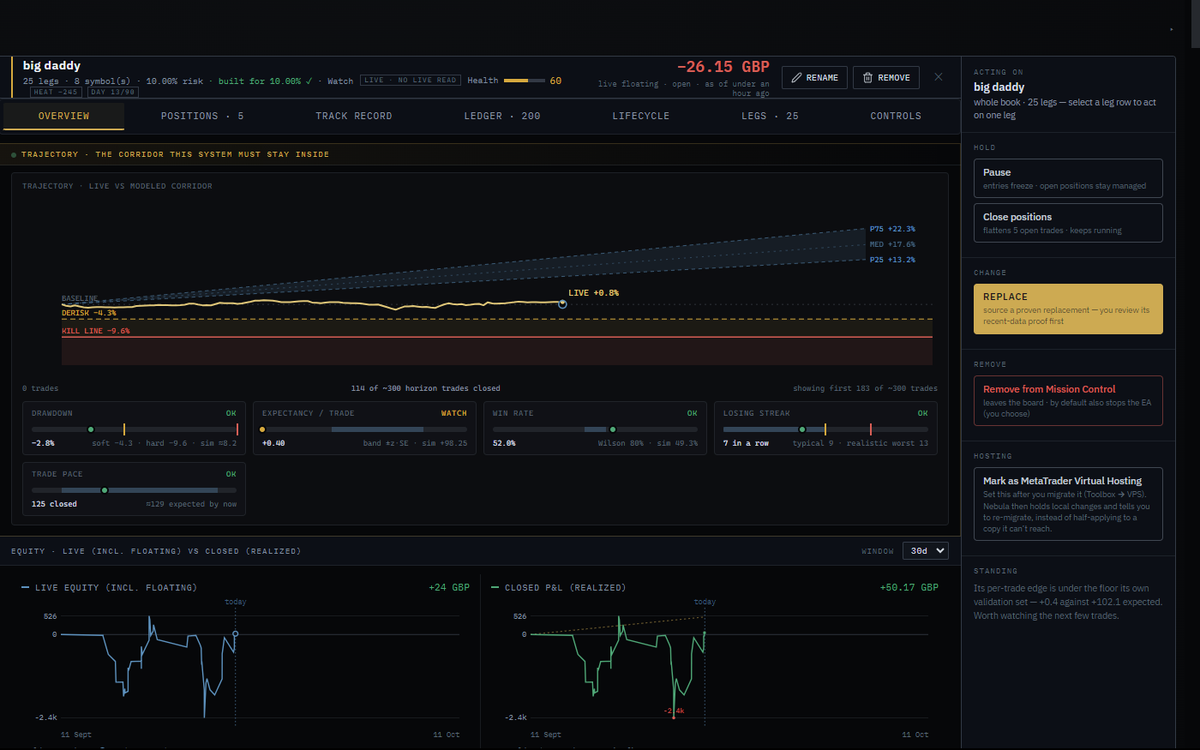
Click a tile. The middle shows that system and the right rail shows what you can do. Tabs: Overview, Positions, Trades, Lifecycle, plus Legs for a book.
Act from the right rail
The rail is grouped Acting on, Hold, Change, Hosting and remove.
| Button | What it does | Plan |
|---|---|---|
| Pause | The EA stays on its chart and manages open trades, but opens nothing new. Takes about 10 seconds | Starter and up |
| Resume | Lifts the freeze. After a risk stop it asks first | Starter and up |
| Close positions | Closes this system's open trades at market. It keeps running | Starter and up |
| Reset caps | Clears the EA's own drawdown stop on the same system, history kept | Starter and up |
| Replace | Finds a replacement that passes a re-test on recent data. Nothing swaps until you approve | Starter and up |
| Restore previous | Swaps back to the system that ran here before the last swap | Ultimate |
| Auto replace when it fades | Swaps a stronger system in by itself when this one falls below its range | Ultimate |
| Remove from Mission Control | You choose: close trades now, let them finish, or keep watching | Starter and up |
Replacing is its own guide: see Replace a live system that has faded.
Set an account drawdown ceiling
Mission Control›Whole book›Risk desk›Account drawdown ceiling
| Option | What it does | Default |
|---|---|---|
| Account drawdown ceiling switch | Arms the account wide stop | Off |
| Percent box | How far from its peak the account may fall | 15%, allowed 2% to 60% |
| Reset account | Counts drawdown from today's equity. Systems a risk stop paused trade again. Manual pauses stay paused | n/a |
With it on, if the account falls that far from its peak, every Nebula system closes its trades and stops. Systems deployed while it is on carry the stop inside the EA, so it works with Nebula closed.
How drift warnings work
Nebula waits for enough evidence before it judges a system.
| Rule | Value |
|---|---|
| Closed live trades before any WATCH verdict | 20 |
| Closed live trades before an UNDER verdict | 30 |
| Days deployed before any verdict | 3 |
| Bands judged from | 20 closed trades |
Warnings arrive as messages inside Nebula. A risk stop also goes to your phone if you set up Telegram (Pro and Ultimate).
If something goes wrong
STARTER AND UP and See plans →
WhyYou are on Nebula Free
FixUpgrade to Starter or higher
Mission Control is empty.
WhyNothing deployed from this install yet
FixPress Go to Deploy and deploy a system
Dot says Offline
WhyMetaTrader is closed or not logged in
FixOpen MetaTrader and log in
Every tile says IDLE
WhyNo live reading yet
FixLeave Nebula and MetaTrader open for a few minutes
Show 4 more
AUTOTRADING OFF
WhyAlgo Trading is off in MetaTrader
FixClick Algo Trading in the MetaTrader toolbar so it turns green
Not on a chart
WhyThe EA is installed but not attached
FixPut it on its chart. See Your Nebula EA is not taking trades
A system you expect is missing
WhyYou are on a different MetaTrader account
FixLog in to the account you deployed to. Mission Control shows the current account
Old build after a change
WhyMetaTrader still runs the previous file
FixAttach the new EA or restart MetaTrader
Questions
Does Mission Control need Nebula open?
Yes, it checks while Nebula is open. On Ultimate, Fully hands-free monitoring in Settings keeps it running in the tray.
Does a WATCH mean I should stop the system?
No. It means drifting inside its limits. Nothing needs doing yet.
Does removing a system stop the EA?
Only if you pick close now in the remove dialog. Otherwise the EA may still be on your terminal.