Find a re-tested replacement for a live system and swap it in under the same EA file.
You need
- Nebula Starter or higher
- the system deployed from Nebula and showing in Mission Control
- MetaTrader open
- no test running in Nebula
Which way suits you
| Way | What it does | Plan |
|---|---|---|
| Replace | Nebula finds a match in your library, re-tests it on recent data, and you approve the swap | Starter and up |
| Replace this leg | The same for one leg of a book. The rest of the book keeps trading | Pro and Ultimate (books need Pro) |
| Auto replace when it fades | When the system falls below its tested range, Nebula swaps a stronger one in by itself | Ultimate |
| Restore previous | Swaps back to the system that ran here before the last swap | Ultimate |
Steps (Replace by hand)
Open the system in Mission Control
Click Mission Control, then the system's tile. Look for UNDER or a red icon.
Mission Control›your system
Check you have spares
Under Change in the right rail, a line says how many spares are in your library. No spares in your library means a replacement would need a new search.
Press Replace
Press Replace. Its line reads a re-tested match, you check first. Nothing swaps until you approve it.
Read the comparison
If a match passes the re-test, a window opens with Currently deployed and New variant side by side. The re-test table runs both on the same recent window.
| Row | What it compares |
|---|---|
| Net P&L (window) | Profit over the re-test window |
| Profit factor | Gross win over gross loss |
| Win rate | Share of trades that won |
| Balance drawdown | Deepest fall in balance |
| Trades | How many trades each made |
Columns are Deployed now and Candidate.
Check the data is fresh
If the window says Price data ends with a date days ago, download fresh data for that pair first. Then re-check.
Decide
Press Swap deployed EA → to go ahead, or Keep current EA to leave it. If the engine recommends keeping the current EA, the swap button stays greyed.
Watch the handover
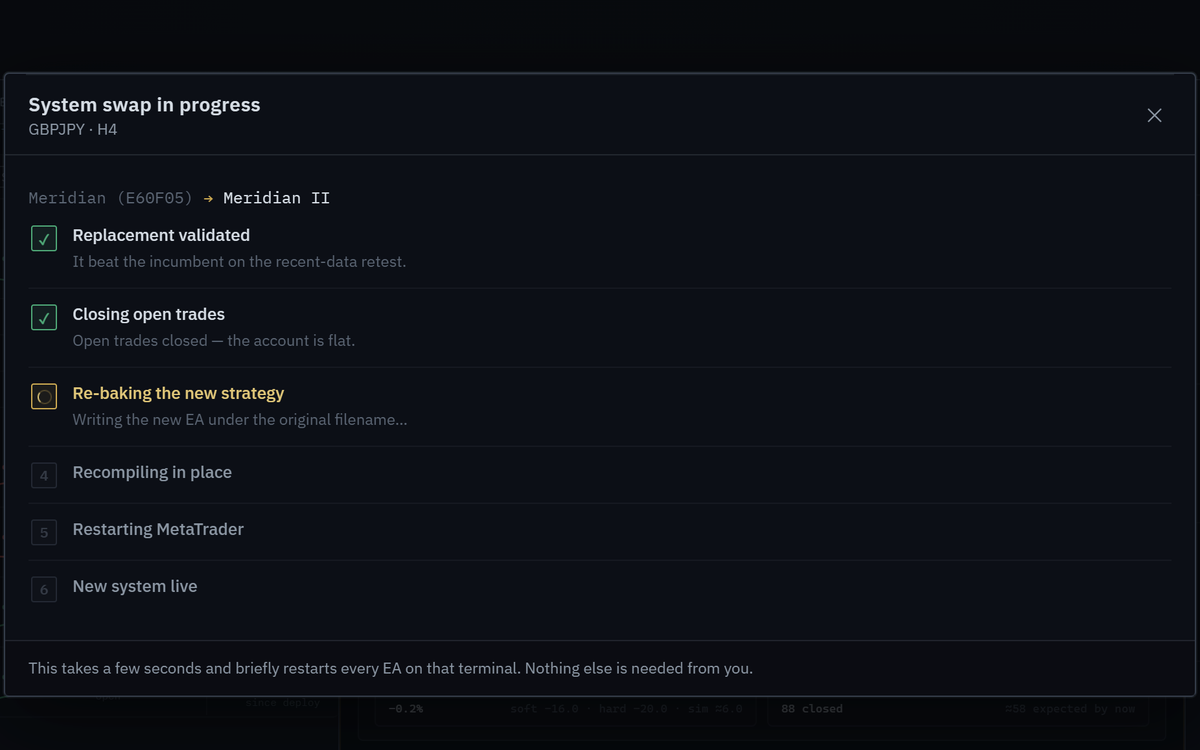
The swap walks through six steps.
| Step | What happens |
|---|---|
| Replacement validated | It beat the current system on the recent data re-test |
| Closing open trades | This system's open trades close so the account is flat |
| Re-baking the new strategy | The new EA is written under the original filename |
| Recompiling in place | A fresh binary replaces the live one |
| Restarting MetaTrader | Your terminal closes and relaunches so the chart loads the new EA |
| New system live | The new EA is loaded |
Turn trading back on
When it finishes, check Algo Trading is on in MetaTrader. The app says: turn on AutoTrading in MetaTrader to start trading.
When nothing matches
You see No matching replacement yet. Nothing in your library is close enough to replace that system right now.
| Button | What it does |
|---|---|
| Run a search → | Opens a new test set to that pair and timeframe |
| See Ultimate | Opens the plans. On Ultimate, a replacement is found and swapped in for you |
| Not now | Closes the window |
Either way, the current system keeps trading. Nothing changes until you deploy something better.
Replace one leg of a book
Pick the leg
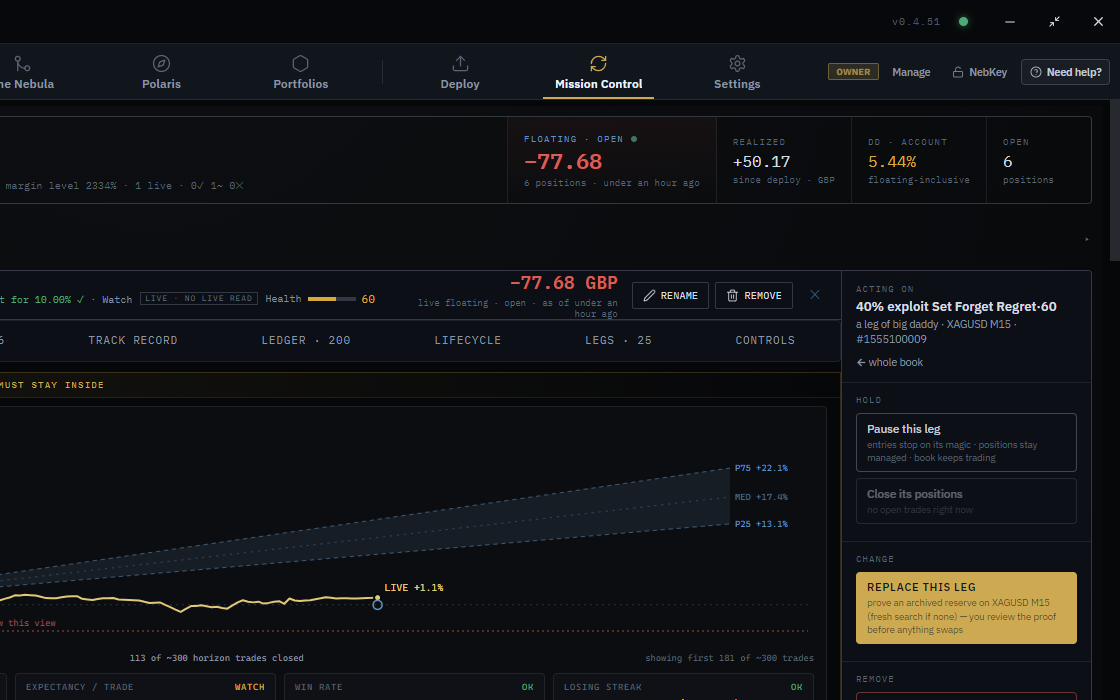
In Mission Control, open the book and click a leg in the Legs tab. The rail shows Acting on with the leg name and ← whole book.
Press Replace this leg
Nebula re-tests a reserve on the same market and timeframe, or runs a fresh search if there is none. You check the re-test before anything swaps.
Hands free on Ultimate
| Setting | Where | Default |
|---|---|---|
| Auto-Refresh Evolution | Deploy screen, before you deploy | Off |
| Auto-replace on decay | Under Auto-Refresh Evolution once it is on | On |
| Auto replace when it fades | Mission Control › system › Change | Follows what you set at deploy |
With these on, Nebula watches the system. When it drifts below its tested range and a clearly stronger version passes the checks, it swaps it in under the same EA file name without asking. It acts on decay, never on a calendar. Turn the switch off and you are told to swap it yourself instead.
Restore previous appears after a swap. It rolls back to the previous system with the same file and magic number, so the record stays continuous.
If something goes wrong
Replace is greyed with manual swap starts at Starter
WhyYou are on Nebula Free
FixUpgrade to Starter or higher
a test is running, replace when it ends
WhyA Nebula test is running
FixWait for it to finish
On a book, Replace says pick a leg to replace it
WhyBooks swap one leg at a time below Ultimate
FixPick a leg, then Replace this leg
Hands-free swap was withheld because your confirmation is the gate
WhyA safety check needs you
FixRead the reasons, then decide by hand
Show 4 more
Price data ends some days ago
WhyThe re-test used old data
FixDownload fresh data for that pair and re-check
After the swap nothing trades
WhyAlgo Trading is off, or the new EA is not on its chart
FixTurn on Algo Trading. See Your Nebula EA is not taking trades
Old build icon after the swap
WhyMetaTrader did not reload
FixRestart MetaTrader
Marked as Virtual Hosting
WhyLocal swaps cannot reach the hosted copy
FixMigrate again in MetaTrader: Toolbox, VPS
Questions
Does a swap close my open trades?
Yes. It closes that system's open trades first, so the account is flat for the handover.
Do I need to re-attach the EA?
No. The new strategy goes in under the original filename and MetaTrader restarts to load it.
Does Replace pick any system?
No. It looks for a like for like on the same pair and timeframe that passes a re-test on recent data.