Choose when your systems may open trades and when they must stop, before you build them.
You need
- Nebula open with the engine online
- a test you are about to start
How rules work
Rules are set before a test. Every system the test builds obeys them, and the EA you deploy enforces the same rules inside MetaTrader. A rule changed later applies to the next test. Systems already built keep the rules they were tested with.
You set them in two places.
| Place | What it holds |
|---|---|
| New Test › Standard | Trading hours, news, weekend and your loss limits, as simple cards |
| New Test › Explore › 04 Mode › Hard Rules… | The full list of 17 rules, with every setting |
The news minutes also live in Settings › News avoidance.
Steps (Standard lane)
Open New Test on Standard
Click New Test, then Standard.
New Test›Standard
Pick trading hours
Under 04 TRADING HOURS, pick All hours, London, New York or Skip Asia. Then tick any of Skip Monday open, Skip Friday, Skip Sunday candle. The card counts the open hours out of 24.
Set news
Under 05 NEWS, tick Step aside for big news. It is on by default. Pick Close trades (the default) or Pause new trades.
Set the weekend
Under 06 WEEKEND, tick Flat by Friday and pick a Cut off from 16:00 to 22:00. Default 20:00. After the cut off, no new trades open on Friday.
Set your loss limits
On the right under Size and limits, fill the four boxes.
| Box | What the EA does when it is hit | Default |
|---|---|---|
| Total drawdown % | Freezes new entries for good. Open trades run to their own exits | 10 |
| Daily loss % | No new entries for the rest of the day | 3 |
| Weekly loss % | No new entries for the rest of the week | 6 |
| Losing streak | Pauses new entries after this many losses in a row, until the next day | 5 |
Prop limits fills them from a funded account preset. Changing a box sets it back to No preset.
Decide on Stop trading when a limit is hit
Stop trading when a limit is hit removes systems that would break your limits while the test searches. Picking a prop firm preset turns it on. Pro and Ultimate. Below Pro it is switched off at launch.
Check the summary and build
SETUP SUMMARY lists Hours, Skips, News, Weekend and Limits. Press Build system.
Steps (full Hard Rules dialog)
Open it
Click New Test, then Explore. In 04 Mode, press Hard Rules…. The badge shows how many are active.
New Test›Explore›04 Mode›Hard Rules…
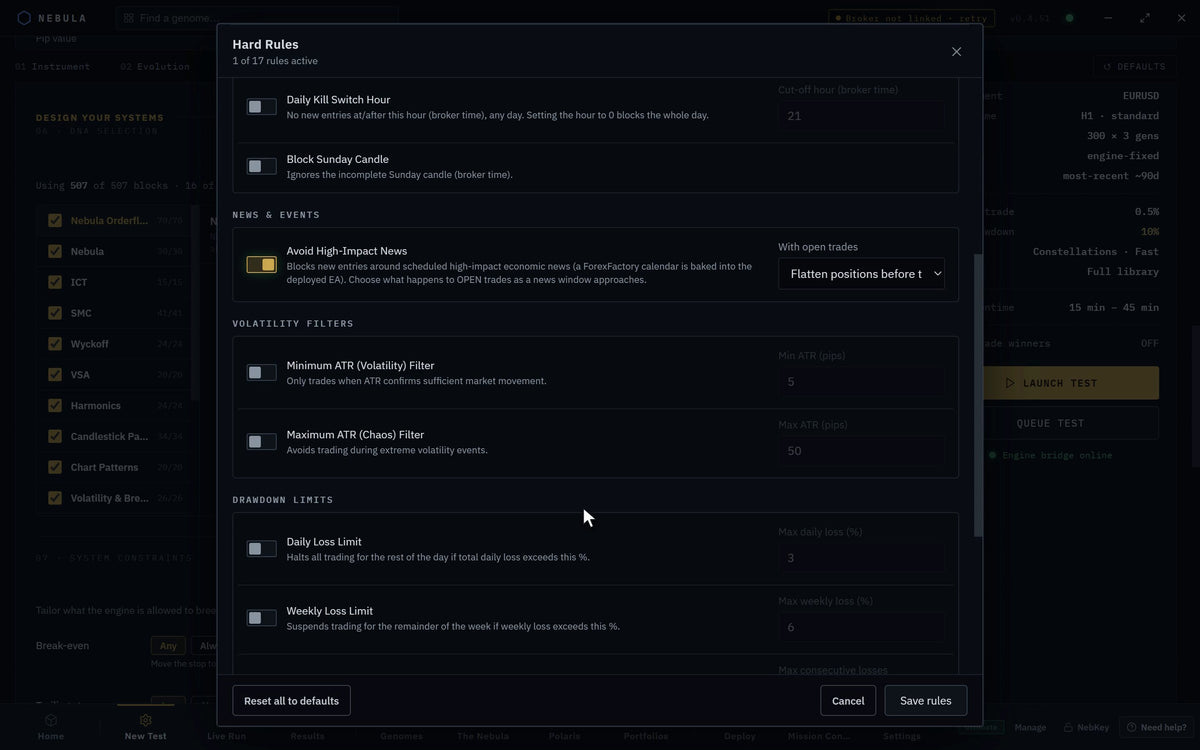
Read the counter
The subtitle shows how many rules are on against your plan's limit, for example 1 of 3 allowed on your FREE tier.
Switch rules on or off
Rules sit in groups: Session / Time, News & Events, Volatility Filters, Drawdown Limits, Trade Quality, Other. Each has a switch and, where it needs one, a value.
Save
Press Save rules. Reset all to defaults clears your changes. Cancel leaves without saving.
Every rule
All hours are your broker's server time.
| Rule | What the EA does | Default | Value |
|---|---|---|---|
| No Friday Trading | No new trades on Fridays | Off | |
| No Friday Close Entries | No new trades on Friday at or after the cut off hour | On | 20 |
| No Monday Open Entries | No new trades before 08:00 on Mondays | Off | |
| London Session Only | New trades only 07:00 to 11:59 | Off | |
| New York Session Only | New trades only 13:00 to 20:59. Turn on with London to allow both | Off | |
| Block Asian Session | No new trades 00:00 to 06:59 | Off | |
| Daily Kill Switch Hour | No new trades at or after this hour, any day. 0 blocks the whole day | Off | 21 |
| Block Sunday Candle | Ignores the incomplete Sunday candle | Off | |
| Avoid High-Impact News | No new trades around high impact news. Choose what happens to open trades | On | See below |
| Minimum ATR (Volatility) Filter | Trades only when the market moves at least this much | Off | 5 pips |
| Maximum ATR (Chaos) Filter | Stands aside in extreme volatility | Off | 50 pips |
| Daily Loss Limit | No new trades for the rest of the day past this loss | Off | 3% |
| Weekly Loss Limit | No new trades for the rest of the week past this loss | Off | 6% |
| Consecutive Loss Pause | Pauses new trades after this many losses in a row | Off | 5 |
| No Counter-Trend Trades | Only trades in the direction of the 200 EMA | Off | |
| Volume Confirmation Required | Only enters when volume is above its 20 bar average times this | Off | 1.2 |
| Block Ranging Markets | Blocks all new trades while ADX is below this | Off | 20 |
A loss limit rule that is on replaces the matching box on the New Test page. Off leaves the page value standing.
The news rule
| Setting | Options | Default |
|---|---|---|
| With open trades | Hold (block new entries only), Also cancel pending orders, Flatten positions before the window, Move stops to breakeven before the window | Flatten positions before the window |
| Before | Minutes before the event with no new trades, 0 to 240 | 30 |
| After | Minutes after the event, 0 to 240 | 15 |
If both minute boxes are blank, the next test asks you and saves the answer. Fill both or leave both blank. A calendar of high impact news is built into the EA when you deploy.
How many rules your plan allows
| Plan | Rules on at once |
|---|---|
| Nebula Free | 3 |
| Nebula Starter | 5 |
| Nebula Pro | 10 |
| Nebula Ultimate | No limit |
Avoid High-Impact News never counts against the limit. No Friday Close Entries is on by default and does count.
What you see in MetaTrader
When a loss limit fires, the EA writes a line in the Experts tab.
| Line starts | Meaning |
|---|---|
[NEBULA] RiskGuard: DAILY loss cap |
Daily limit hit. Trades again tomorrow |
[NEBULA] RiskGuard: WEEKLY loss cap |
Weekly limit hit. Trades again next week |
[NEBULA] RiskGuard: TOTAL drawdown cap |
Total limit hit. New entries frozen until you reset caps |
Limits count from your account balance, so they move when trades close. They survive a restart of MetaTrader.
If something goes wrong
A switch will not turn on
WhyYou reached your plan's limit
FixTurn another rule off, or upgrade
Save rules is greyed
WhyMore rules on than your plan allows, or only one news minute is filled
FixTurn rules off, or fill both minutes
Fill both, or leave both blank.
WhyOne news minute box is empty
FixFill the other box
Rules changed but a live EA ignores them
WhyIt was built before the change
FixRun a new test and deploy from it
The EA stopped for good after a bad run
WhyThe total drawdown cap latched
FixMission Control › system › Reset caps
No trades during London afternoon
WhyLondon Session Only ends at 11:59
FixTurn on New York Session Only too
Questions
Why does a test ask me for news minutes?
The minutes go into the test and into the EA you deploy, so both stand aside for the same window. You agree them again at deploy.
Is Flat by Friday a close of open trades?
No. It stops new trades after the cut off. Open trades keep their own exits.
Where do I re-protect a live EA for news?
In Mission Control, a red or amber news icon opens the fix.