Build a book from your saved systems, set its risk against your limits, and put it on MetaTrader 5.
You need
- Nebula Pro or Ultimate
- saved systems on at least two pairs
- MetaTrader 5 (books do not deploy to MetaTrader 4)
What a book is
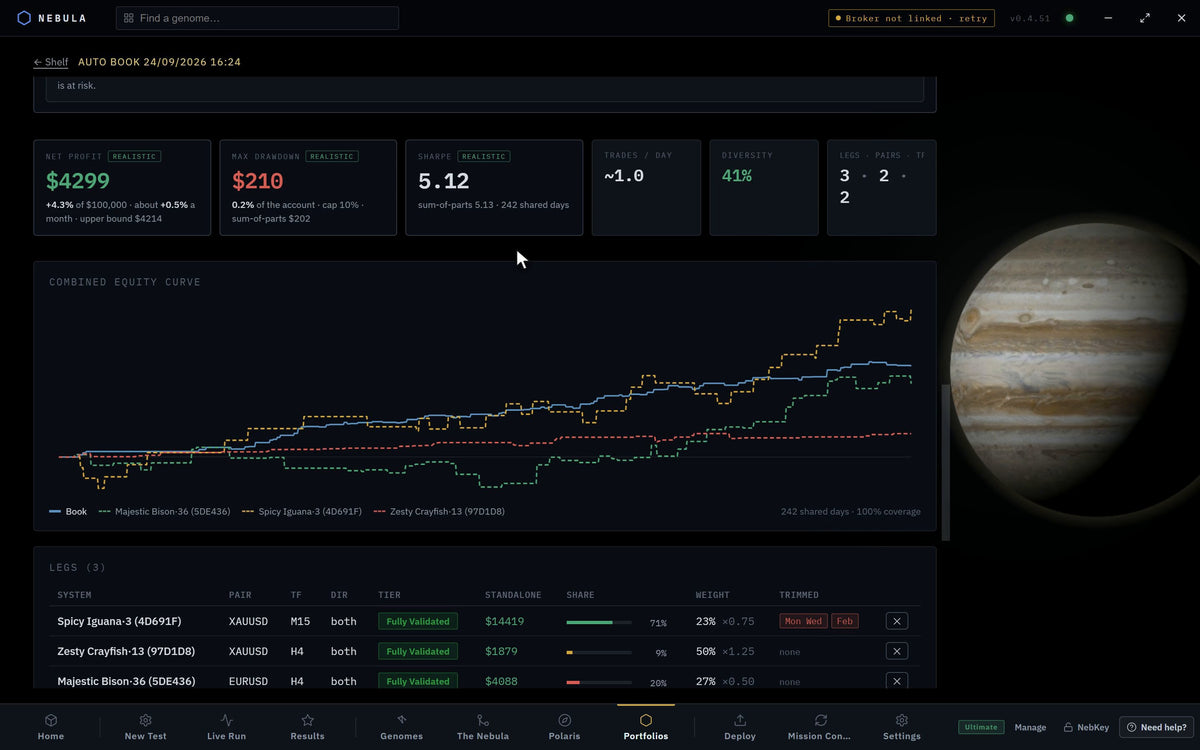
A book (the app also says portfolio) is several systems trading on one account. When one goes quiet, the others carry it. Nebula replays every leg's trades together over the dates they share, so the combined numbers are what they did side by side.
A book deploys as one EA. Attach it to any one chart and it trades every pair in it.
Steps
Open Portfolios
Click Portfolios in the tab bar. Below Pro it carries a PRO pill and opens the plans. The page opens on Several systems. One account. A smoother line.
Portfolios
Pick a route
Under Two ways in, pick one.
| Route | What it does |
|---|---|
| Build it for me | Name a target and a risk. The engine picks the systems |
| Build it myself | Pick a style, then add systems one at a time |
View my existing portfolios under Your shelf opens books you already have. Both routes show NEEDS SYSTEMS until you have finished a test.
Pick a style
Both routes start with the style. Hover a card for its rules, timeframes and what it is judged on.
| Style | What it is |
|---|---|
| Balanced | The all rounder: spread across instruments for a steady climb |
| Intraday | Fast systems, many trades a day, spread by session and instrument |
| Swing | Slow systems, a few trades a month, spread over more instruments |
| Fast / Slow | A fast half and a slow half in one EA, each with its own drawdown stop |
| Prop firm | Legs picked on replays against your firm's daily and total loss caps |
| Session | One trading session (London, New York or Asia), flat the rest of the day |
| Single-pair ladder | One instrument, spread across timeframes |
| Quant Book | Up to 100 systems, each trading on its own, with no mix rules |
Compare styles shows them side by side.
Fill in your route
Build it for me. The wizard walks through How many systems?, Account and pairs and Anything else?, then Start the build. Turn on ADVANCED to build by character: timeframes, Trades a day and Average RR. Start with yours holds systems you pick and lets the engine add the rest. Build to a target adds systems until the target is met within your limits.
Build it myself. The book opens on your style. Add systems one at a time under Add the systems. You can try a leg before it joins. What to add next suggests the next leg. Build trail lets you go back to any earlier build.
Set the two switches on Build it myself
Both sit in the bar above the style cards.
| Switch | What it does | Default |
|---|---|---|
| AUTO EVOLUTION | Every leg gets a named substitute and a failed leg is swapped for it. Off: a failed leg is cut and not replaced | On |
| START LOW, STEP UP | A quarter of the risk until a system has 20 closed trades, half until 50, then full. Back to a quarter while its drawdown is deeper than in testing | Off |
Set the limits the book is judged against
Every book with two or more legs shows the risk panel.
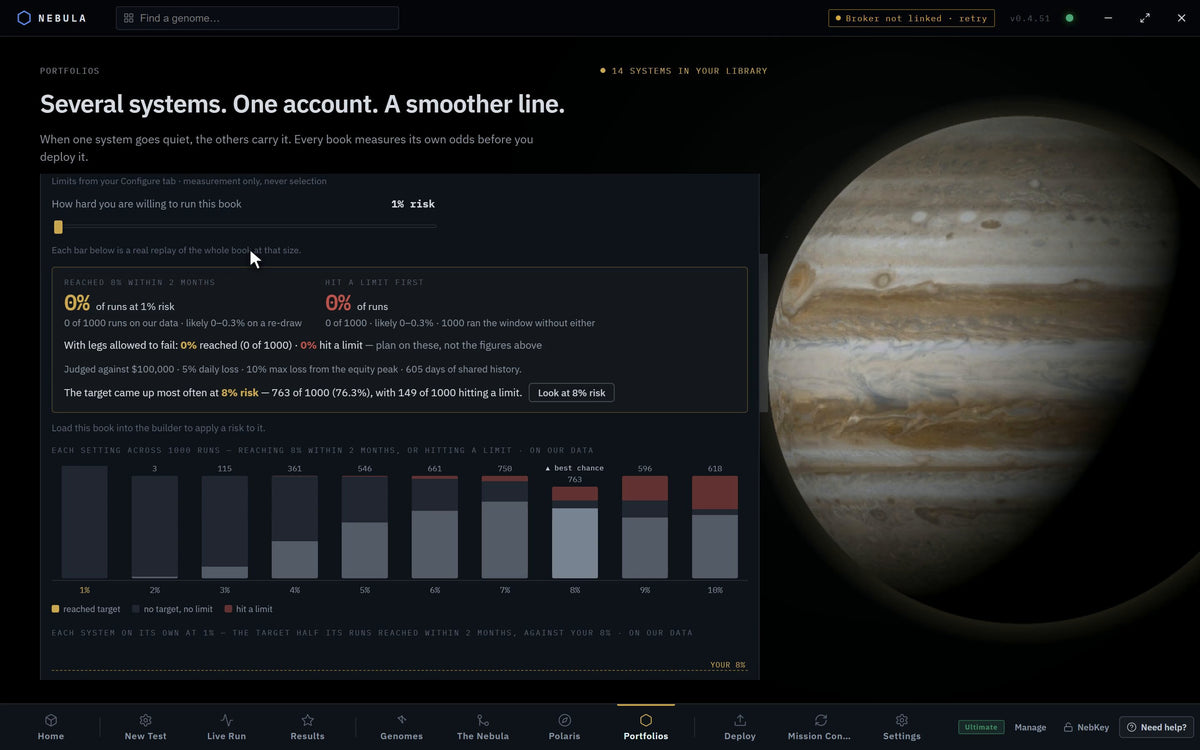
| Field | What it does | Default |
|---|---|---|
| Profit target | The target the replays are read against | 8% |
| Within | 1 MONTH, 2 MONTHS, 1 QUARTER, 6 MONTHS, 1 YEAR | 2 MONTHS |
| Account | The account size the book is sized to | Your Build page value |
| Daily loss | Your daily loss limit, % | Your Build page value |
| Max loss | Your total loss limit, % | Your Build page value |
| FROM PEAK / FROM START | Whether the max loss floor rises with your peak, or stays fixed below your start balance | FROM PEAK |
| Preset… | Fills the limits from a funded account programme | None |
| Use Build page | Goes back to the Build page values | n/a |
Pick the sizing
Sizing has three buttons.
| Sizing | What it does |
|---|---|
| Fixed | Every trade the same size |
| Protect | Sizes by the room left to your loss lines. 1% a system |
| Chase | The same, at 1.5% a system |
Set the book risk
Move Book risk per trade, all systems together. It steps 0.5%, 1%, 1.5%, 2%, 2.5%, 3%, then 4% to 10%. Under it, Nebula shows the worst day and worst week at that risk on unseen trades. If the worst day would pass your daily limit, it says Capped at and stops there.
Apply it
Press Use 0.5% for this book (it shows your number). It changes to This book runs at 0.5%. Each system runs at the risk it was tested at unless you change it here.
Review and mark complete
At Review, then deploy, read the legs and true stats. Press Mark complete.
Deploy the book
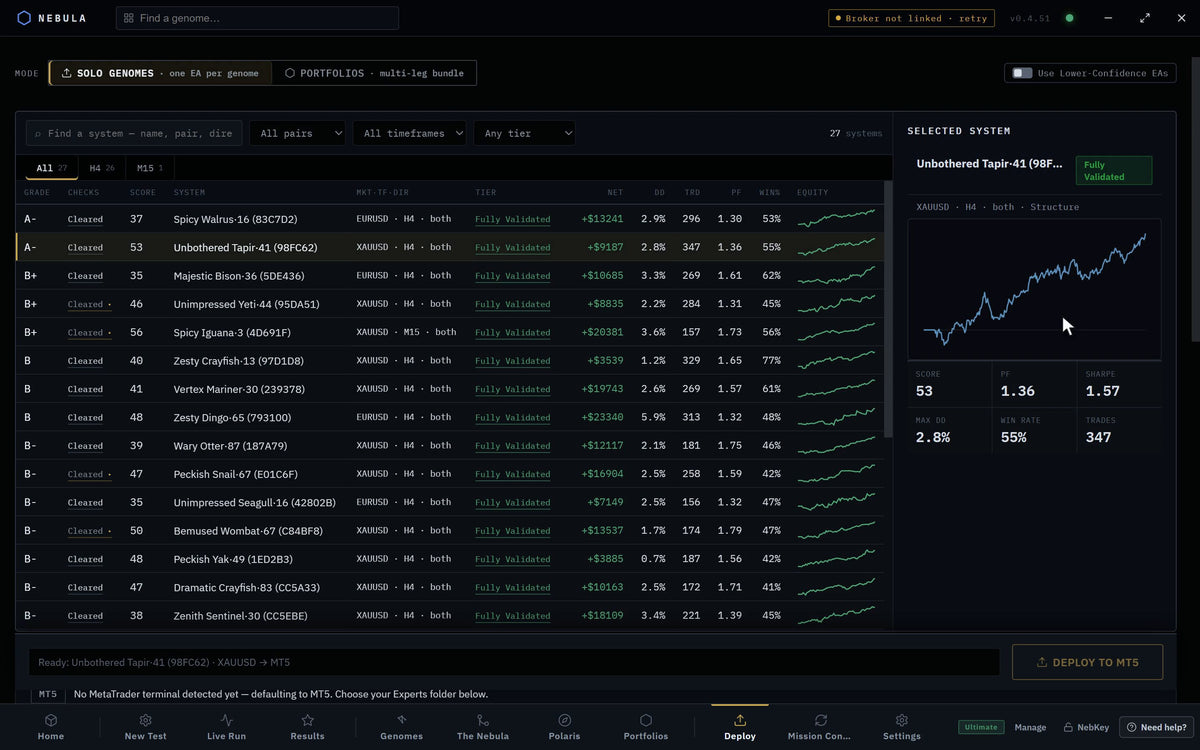
Open Deploy. Under Mode pick Portfolios · multi-leg bundle. Pick your book. Press Compile & deploy → MT5.
Deploy›Mode›Portfolios›Compile & deploy → MT5
Put it on one chart
In MetaTrader, find the EA under Expert Advisors › Nebula. Attach it to any one chart. Each leg already knows its own pair and timeframe.
Other shelf actions
| Action | What it does |
|---|---|
| Combine portfolios | Pick two books. They run as one EA with a risk split, each half keeping its own drawdown stop. Both originals stay |
| Delete | Removes books. Their systems stay in your library |
| Export | Saves the book's legs as CSV |
If something goes wrong
PRO pill on Portfolios
WhyYou are on Free or Starter
FixUpgrade to Pro or Ultimate
NEEDS SYSTEMS
WhyNo saved systems yet
FixFinish a test and save systems first
A book needs systems on at least two pairs.
WhyYour pick covers one pair
FixAdd a system on another pair, or use Single-pair ladder
Your attached terminal is MetaTrader 4.
WhyBooks deploy to MetaTrader 5 only
FixConnect a MetaTrader 5 terminal
Show 4 more
Portfolios require an MT5 terminal on the deploy button
WhySame as above
FixSame as above
These systems could not be combined.
WhyTheir tests share no dates
FixPick systems whose tests overlap in time
No risk set for this book yet. on Deploy
WhyYou never applied a risk
FixGo back to step 9
One pair's leg never trades
WhyThat pair is not in your broker's Market Watch
FixAdd the symbol in MetaTrader. The EA warns in the Experts log
Questions
Does the replay forecast a pass?
No. The panel says so: nothing here forecasts a pass.
Can I swap one leg later?
Yes, from Mission Control. Pick the leg, then Replace this leg. See Replace a live system that has faded.
Do I need one chart per pair?
No. One EA on one chart trades every leg.